Make room
Rest your iPhone upright on a steady surface. Face the front camera and give both hands room in the frame. Even lighting helps hand tracking see each finger.
A GESTURE GAME FOR IPHONE
An old bracelet has been waiting in an antique shop. When it responds to En, an ordinary day becomes the beginning of a journey across strange worlds. Your hands decide what happens next.
FingerBeat is a gesture game built around spell casting. Place your iPhone in front of you, read the next hand pose and bring the bracelet to life. There are no buttons to memorise for combat: the sequence is in your fingers.
In development · iPhone · English & Russian
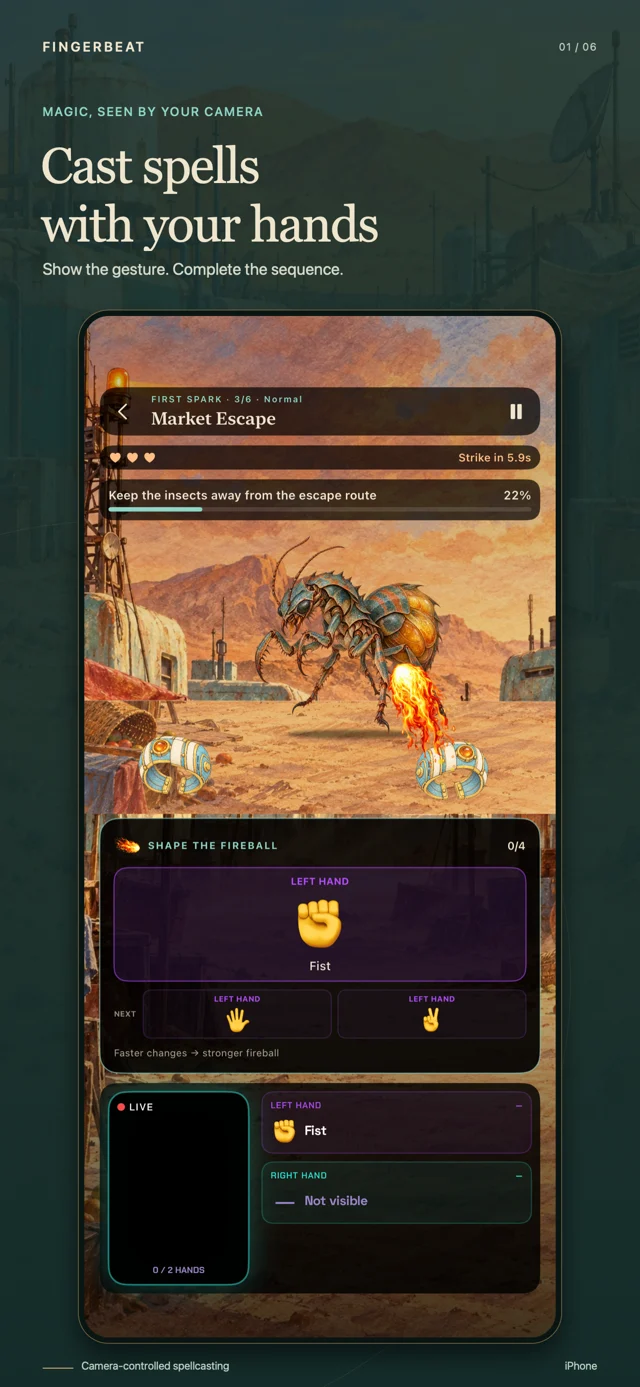
A camera game should make sense before the first fight. FingerBeat shows a pose, recognises it and moves on immediately. The next cue gives your hands somewhere clear to go.
Rest your iPhone upright on a steady surface. Face the front camera and give both hands room in the frame. Even lighting helps hand tracking see each finger.
An open palm, a fist, two fingers: follow the hand gestures on screen. Gesture recognition happens on the iPhone. A matching pose advances the chain without waiting for an animation to finish.
Complete the sequence to cast. Spell casting in the story rewards a clear, quick response; later encounters combine one-hand cues with paired hand poses.
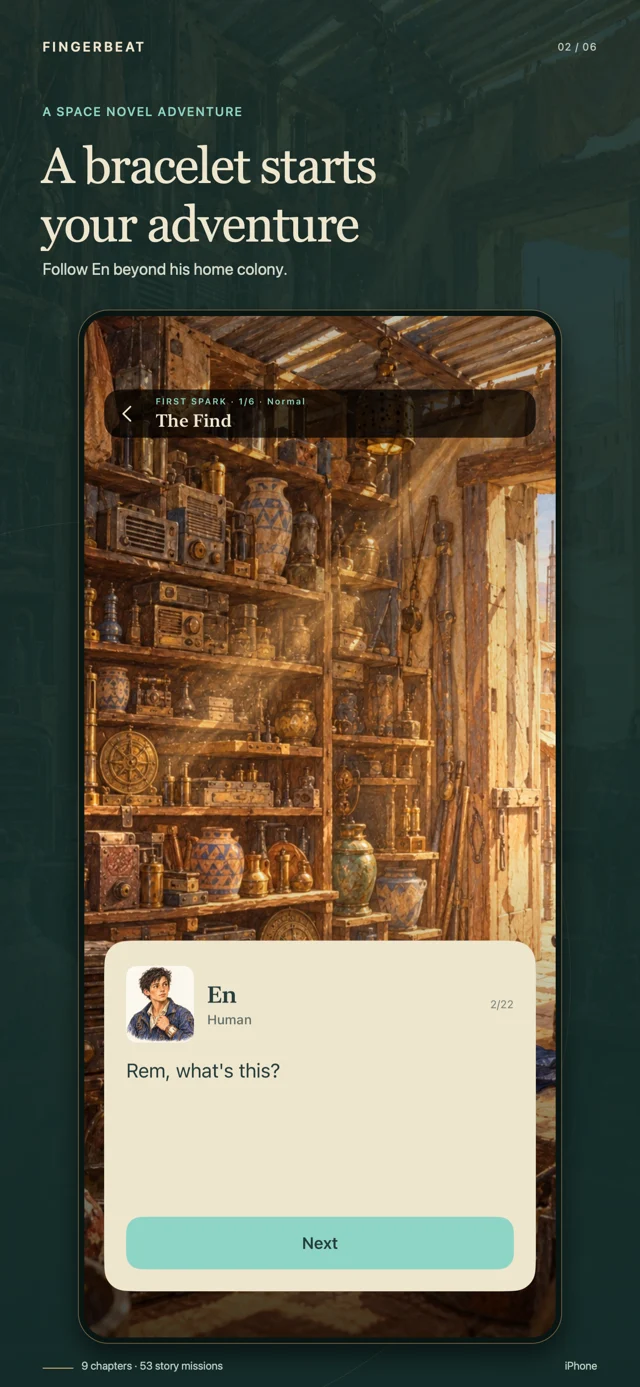
En helps an antiques dealer sort through the forgotten objects of a desert colony. One discovery changes the work: an ancient bracelet activates on his wrist. Before he has time to understand it, the settlement needs help. Learning spell casting becomes something urgent and practical.
The story-driven campaign follows En and his companions away from home, through crowded ports, dark forests and industrial worlds. Illustrated conversations give the journey its pace between playable encounters. Friends have their own reasons to travel; people who offer help may expect something in return.
This is a single-player sci-fi adventure told across nine chapters and 53 missions. You meet unfamiliar inhabitants, protect your companions and face bosses who demand longer sequences. Each mission has its own continuous musical composition, so the sound belongs to the scene rather than changing after every small action.
Four campaign difficulties change the time available before an enemy strike. Easy leaves more room to read and react; Normal, Hard and Hardcore ask for greater control. You have three lives, and the countdown keeps moving when your hands leave the camera. Pause when you need a break.
Follow a story-driven gesture game through En’s encounters. Build a spell one pose at a time, switch between single-hand and two-hand sequences, then test your response against a boss. Dialogue, watercolor worlds and mission music give the hand-tracking game a place and a purpose.
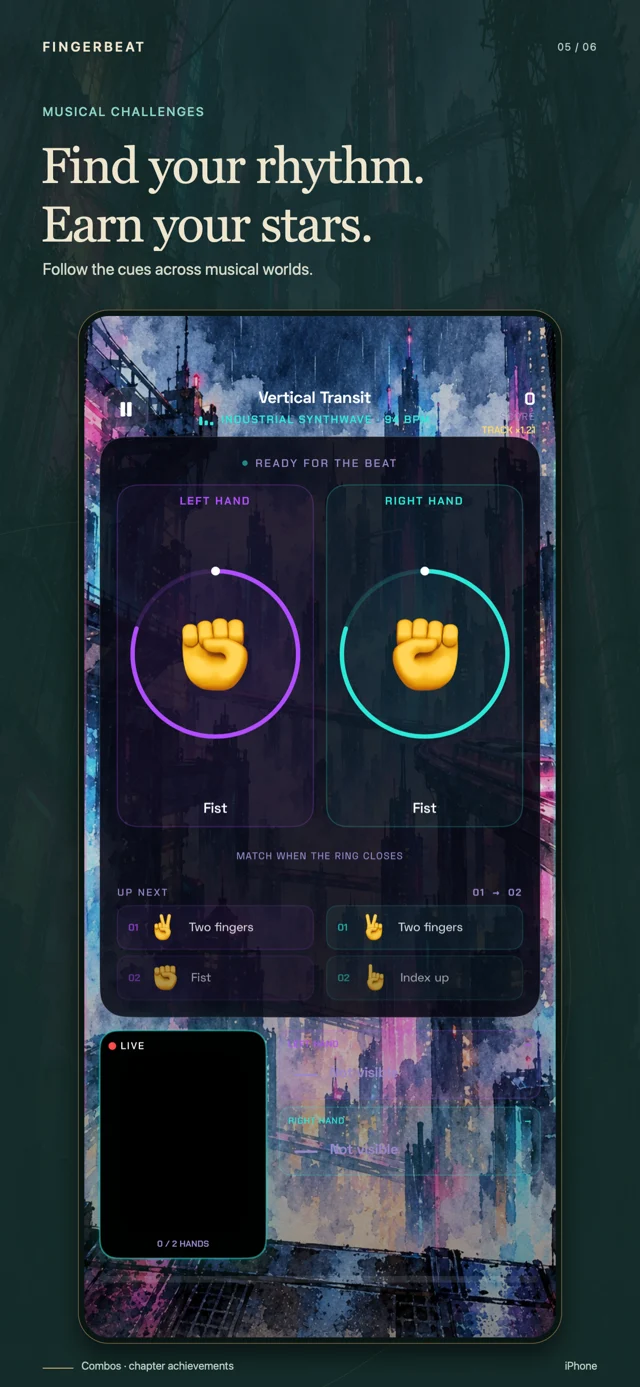
The musical mode turns hand gestures into a rhythm game. Work through 41 levels in seven themed worlds, including neon streets and fantasy settings. Watch the cues, keep a combo and earn stars. Challenges adds a musical reason to practise coordination after a story session.
Choose the hand poses you want, one hand or both, and a tempo from 60 to 180 BPM. Set one, two or four beats per cue. Training accepts a matching gesture immediately; the beat controls your time allowance. Use this gesture practice mode to get familiar with a new pose before returning to the campaign.
Screens from the current development build. The game interface and story are available in English and Russian.
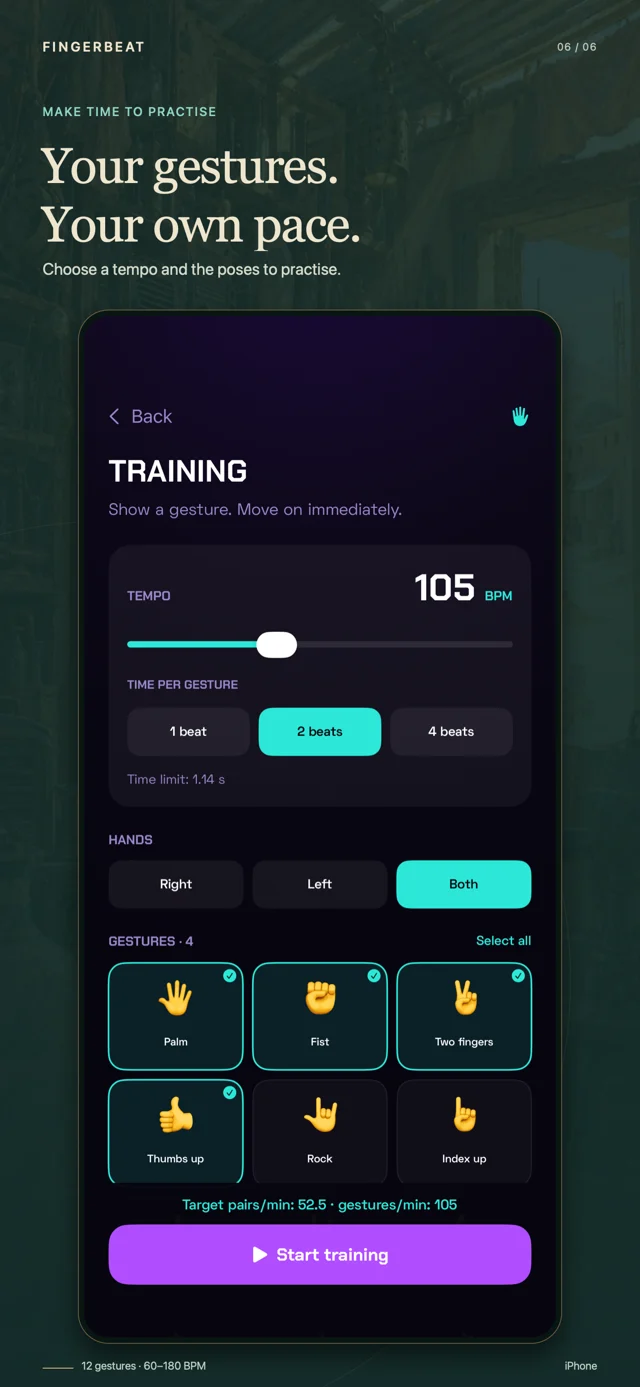
A gesture game becomes more comfortable when you know what the next movement feels like. Start with a palm and a fist, then try the peace sign or a thumbs up. For an OK sign, bring thumb and index fingertips together while keeping the other fingers extended. Training lets you select only the poses you want to rehearse.
Two-hand play adds another layer: the hands may need to show the same pose or different ones. Give each hand its own space and stay away from the edges of the camera frame. Clear finger positions matter more than large arm movements. Practise hand coordination in short sessions, then return to the sequence that gave you trouble.
FingerBeat’s camera controls use the front camera and on-device recognition. No wearable, motion controller or separate tracking accessory is required. Recognition still depends on the camera’s view, lighting and how clearly the pose is held. If a sequence feels rushed, change the campaign difficulty or spend a few minutes with the same gestures in Training.
Chapter I, the ten introductory Challenges through their two-hand finale, and custom Training are free. They give you time to understand the camera game and decide which mode you enjoy.
A single full-game purchase opens story chapters II–IX and the later Challenges worlds. There is no subscription. Unlocking access keeps the level progression in place, and purchases can be restored with the Apple Account used to buy them. The public App Store release is still being prepared.
FingerBeat is a gesture game for iPhone that combines an illustrated science-fiction campaign, spell casting, musical Challenges and configurable Training. You play on your own and use hand poses instead of tapping combat buttons.
No. Place it on a stable surface facing you. Gesture control needs a clear front-camera view, so leave room for your hands and check the preview before a mission.
Both styles have their own mode. The campaign advances as soon as it recognises the next gesture in a spell sequence. Challenges asks you to respond to musical cues. Training lets you choose a pace and set of gestures.
Hand recognition runs on the iPhone. FingerBeat does not record or upload camera footage. Usage analytics is enabled by default and can be disabled in Settings; it excludes camera images, hand landmarks and recognised poses. Read the Privacy Policy for details.
An iPhone with iOS 17 or later, permission to use the front camera and enough space to show your hands. Optional later-chapter media downloads from Apple before you enter the chapter. Installed chapter files can then be reused offline.
Email zausaevdmitrii@gmail.com. Describe the screen and what happened; please avoid attaching private camera images.
Follow the story, find a musical challenge or take your time in Training. FingerBeat is being prepared for its public iPhone release.
Discover the game